• Lifestyle
  • Analog
  • Misc.
  • Shop
  • Contact
  • About
  • Blog
Menu

Tom Price Photography

  • Lifestyle
  • Analog
  • Misc.
  • Shop
  • Contact
  • About
  • Blog

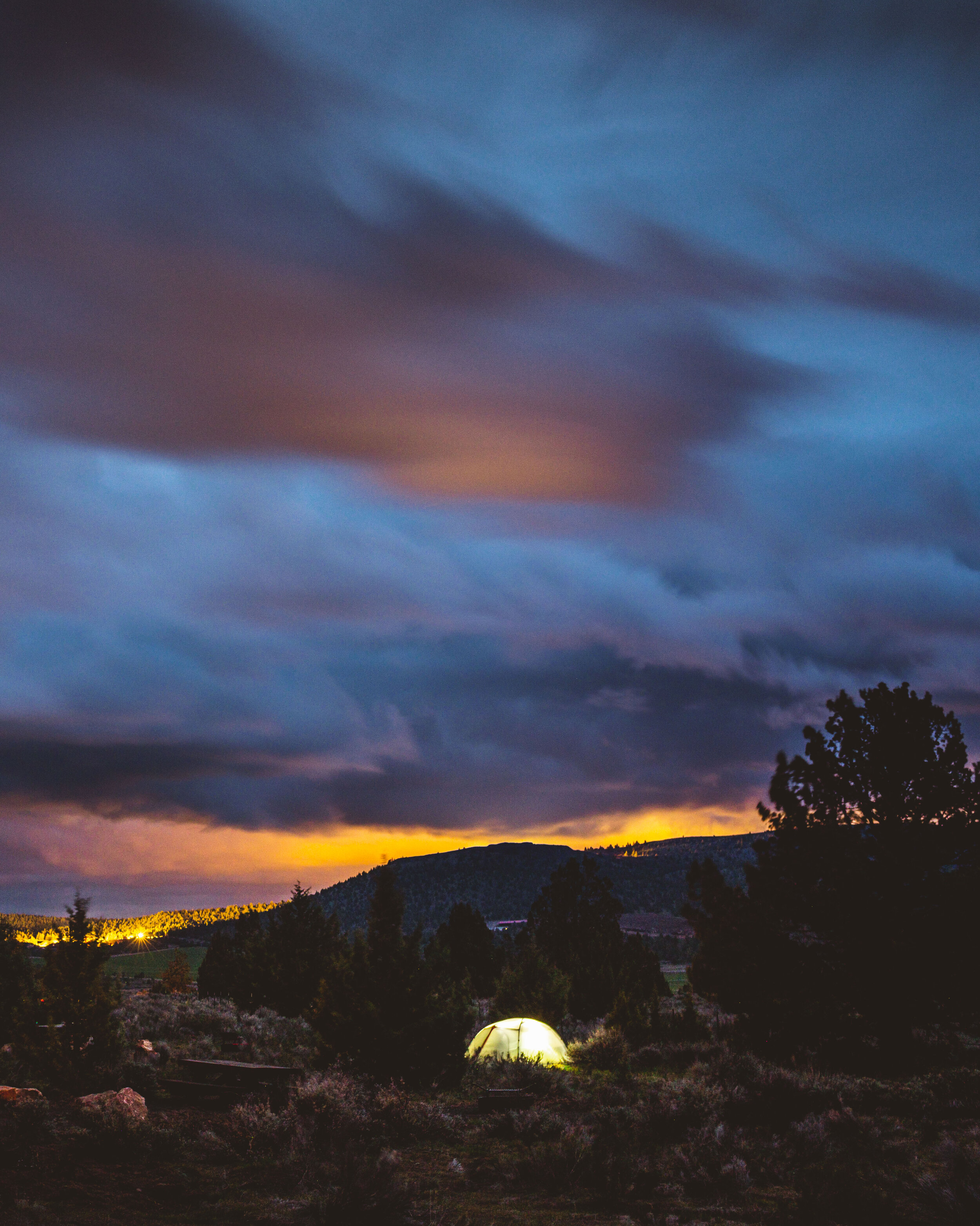
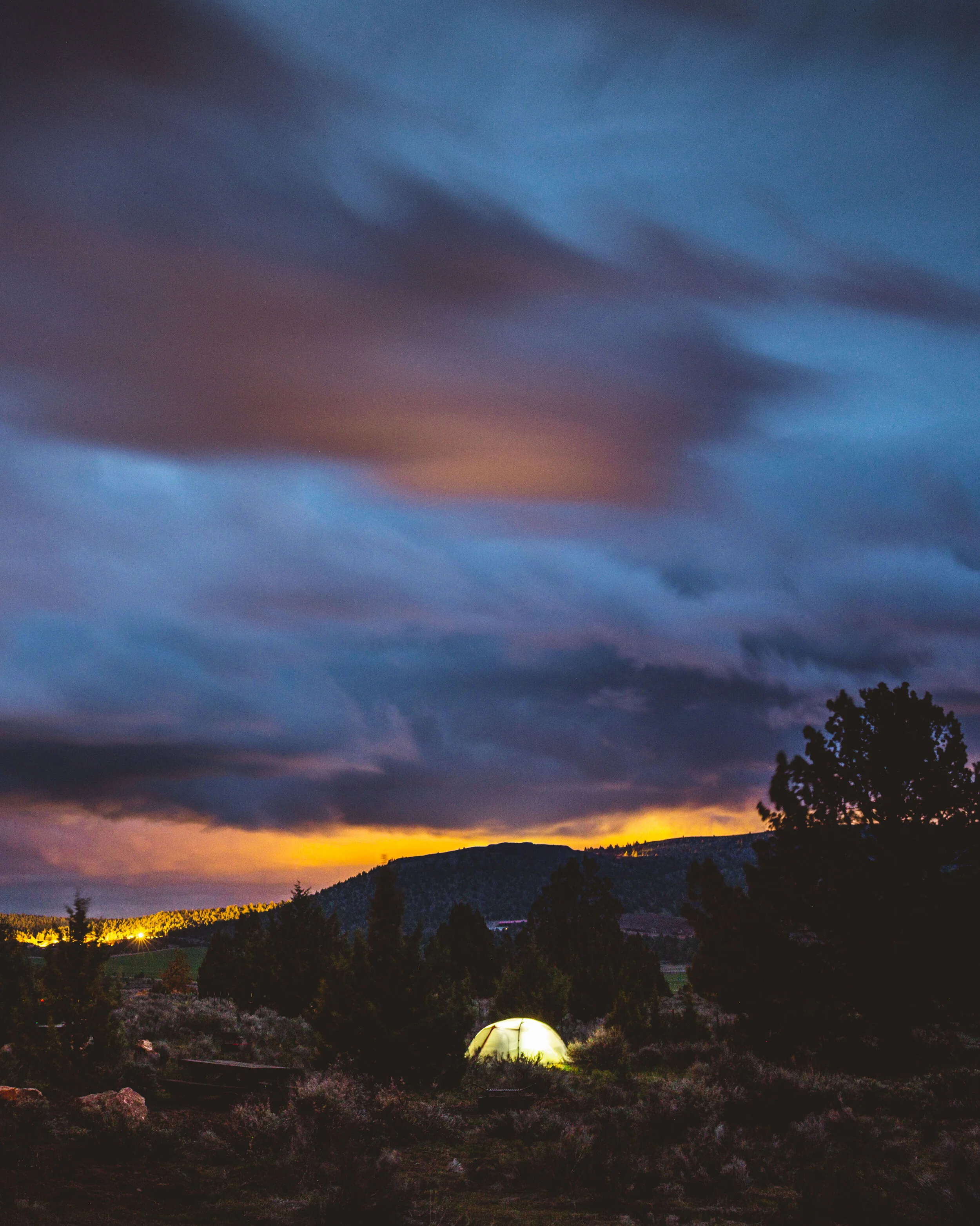
Smith Rock, OR. 2019. Fujifilm x100s on a tripod.

Two Minutes Between Frames Can Make all the Difference!

May 23, 2021

This might be my current favorite image. I’ve always told myself that there is no such thing as a favorite image because the next picture I take better be my favorite. Though, this is not usually the case and making images that I am truly proud of has become harder then ever recently. But, it’s funny because whenever I need inspiration to create this is the image that always comes to mind. A favorite image is quite subjective and I’d say there’s a difference between the best image I’ve ever taken and my favorite photograph. This fits in the favorite category because technically it’s a bit soft on a low resolution sensor, but has everything a good photograph should.

The real reason I’m writing this is that I was going over images and noticed how much this image stood out compared to ones taken slightly before and after. Also, how this image basically just made itself no fancy preparation, previsualization, just a button press. It’s a truly fleeting moment, the gold standard in photography, where minutes before or seconds after wouldn’t yield the same result. A blend of happenstance, luck, and existing to witness a moment, all intersect to create the perfect image.

The story of this image starts, like many others in 2019, with a trip hosted by the College of Idaho Outdoor Program. We spent three days climbing in Smith Rock State Park where I took some of my favorite images of the year. That first day we arrived later in the afternoon just in time to scout some crags and set up camp. As we ate dinner and settled in we could see the clouds darken and felt the cold wind of an incoming storm. I remember sitting around the campfire bundled up and not ready to move away from the warmth, but some feeling to make images as the earth shadow rose was too strong. After setting up the tripod and noticing there was only a half battery in the Canon (I still had two days left there), I grabbed the Fujifilm x100s which had two expendable batteries.

It was dark out and the sky was hard to see with the naked eye but I know from the faint city glow there was something to be had. So I mounted my little camera to the big tripod, stopped down to F/4 for sharpness, set the camera to 200 ISO in order to keep the grain down, and set up a 2 second timer to reduce shake. It took me nearly 15 minutes to focus the camera to infinity before I took a series of shots. It was amazing the subtle tones and color the camera picked up and how quickly the scene was changing between each 30 second exposure.

Somewhere in this series the picture seen above was captured. The churning of the low level clouds and subtle light from dusk peaking through creates drama in the sky. The tent in the foreground was lit up perfectly to match the ambient light and the warm glow projected on the clouds from Bend Oregon, draws the eye to the bottom of the frame giving context to the image. The best part was how a car’s light from some distance away gave the foreground densionality and a matching warm glow that ties the clouds to the ground. A million things came together here all completely out of my control and all making a striking image.

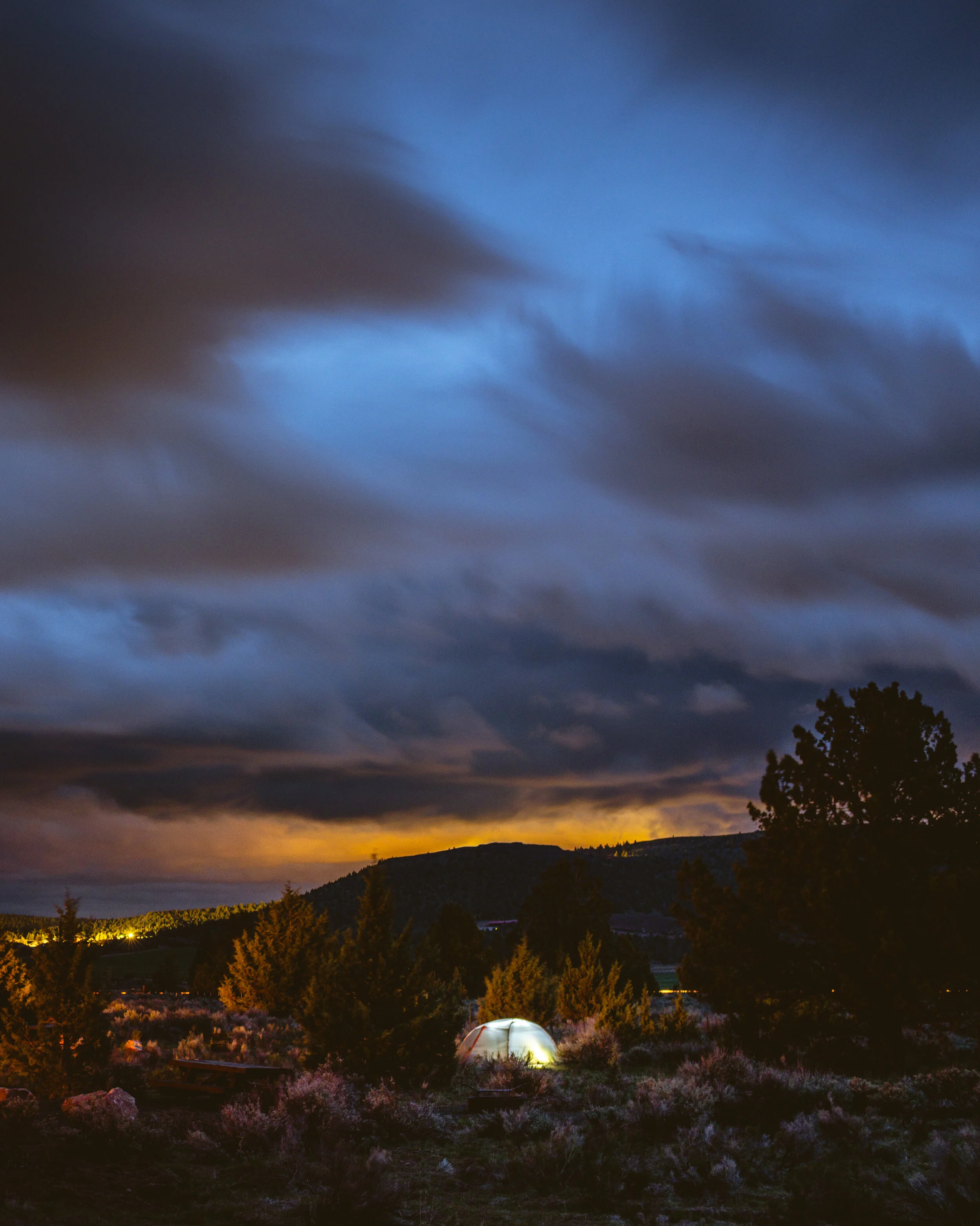
However two minutes later the image changed completely. The images below shows the same location, same shot, on the same day but 1.45 minutes later. Let me know which image you like better but for me it is a pretty obvious choice.
Smith Rock, OR. 2019. Fujifilm x100s on a tripod. Two minutes after the image above.

Smith Rock, OR. 2019. Fujifilm x100s on a tripod. Two minutes after the image above.

This is absolutely another striking image and if this was the only shot I got that night I would have been thrilled. But, it wasn’t and the first shot in my opinion is much better for a multitude of reasons. First, the ambient light dropped enough to overexpose the tent in the foreground and the orange glow is now extremely bright compared to the first image. This makes the light feel unbalanced and makes the exposure look to dark and contrasty. Second, a cloud above the tent caught some warm orange light from the setting sun causing it dominate the sky. I usually love to see color like this in the sky but for this image it draws attention away from the main subject (the tent and the idea of camping) and clutters the scene overall. Finally, and most importantly there is no warm tungsten light in the foreground around the tent like in the first image. This renders the main subject in a more 2D way that looks more boring when compared to the first images. Within just about 2 minutes an image went from my favorite to just another blue hour shot. Below I’ve put them side by side so you can make your decisions.
First image.
First image.

Same scene but 2 minutes after the picture on the left.

Same scene but 2 minutes after the picture on the left.

It was also interesting how I couldn’t get the colors to match either when editing. This is probably due to the ambient light falling, although if I spent enough time I could probably get them to match up. I’ll also confess that there is a fair amount of local adjustments in both images to further even out the tonality.

Anyways, what I’m trying to convey with this is the importance of just being present to witness the light changing. Sometimes photography is as easy as that. This picture was taken with an 8 year old camera with no prior preparation or planning, no fancy accessories, and while others were asleep. It’s not the gear, the hours of class or practice you’ve had, or the youtube videos you watched, it just getting out there and pressing the button.
In Blog, Editing, Photography Tags Photography, digital photography, Fujifilm, Fuji x100s, x100s, smith rock, fleeting moment, lightroom
Comment
DSCF2978.jpg

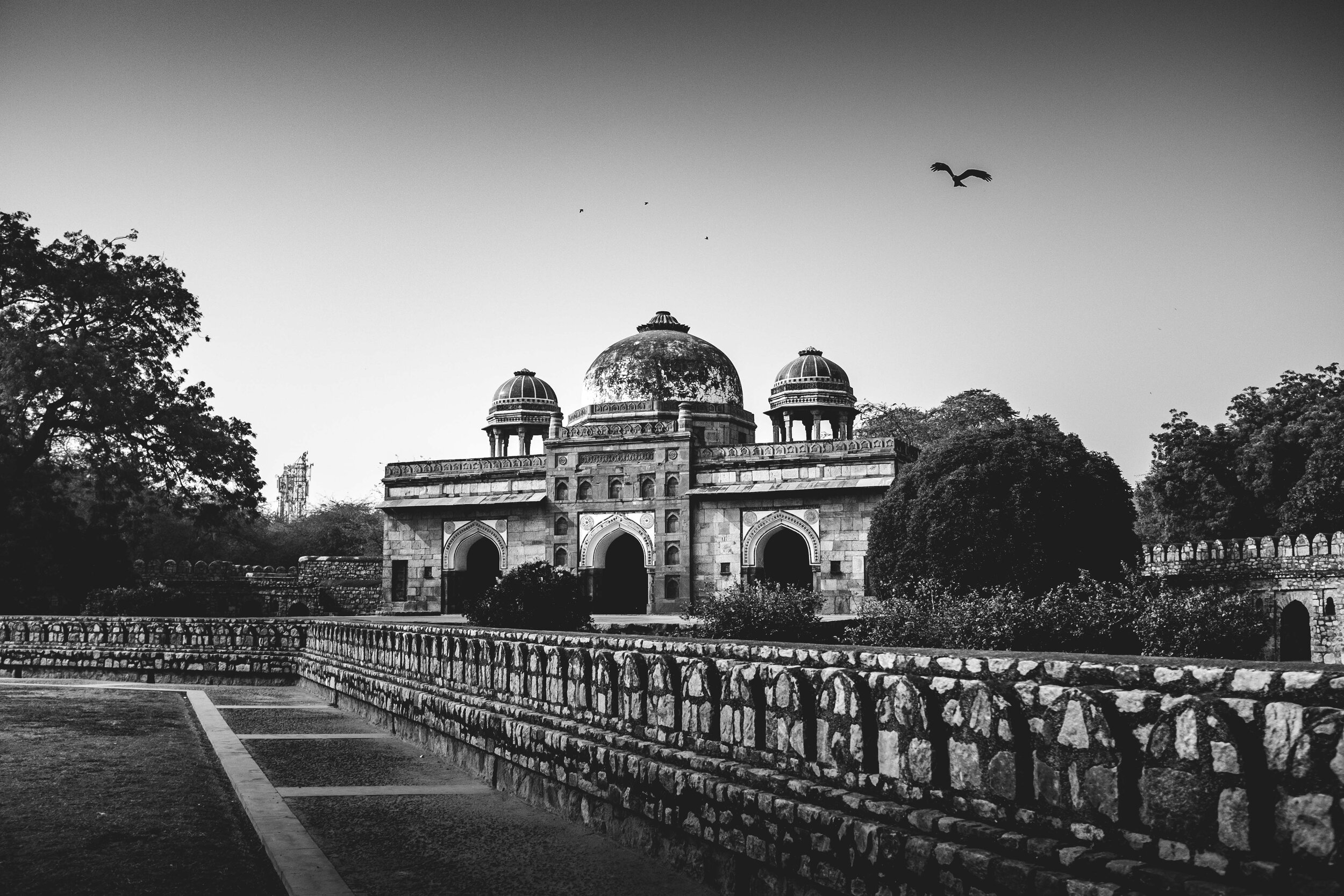
Using Lightroom Collections (India Trip)

March 15, 2020

Since this was a big trip for me I think it would be cool to show people a larger selection of my images. It definitely not every single one because it that would be ridiculous and embarrassing. But is shows what I was looking for when I was creating images there. Now I could just use a bunch of blocks in Squarespace but Lightroom actually has a great solution for this if you’re website doesn’t have great gallery options. Click the button below to experience india and keep reading of you’re interested in using Lightroom for shareable galleries.

India Gallery

I’m probably behind the curve but I hope someone learns a cool new thing Lightroom can do like I did. They’re called Lightroom Collections which are basically folders that you can fill with images you want in the same place. Personally I collect all of the images above a certain rating for a given multi day trip in the same folder for quick access. But what I didn’t know is that you can make these collection public so that clients or friends can access, download, comment/like, or I can even edit images real time all from Lightroom! Here’s how you can do this:

  1. Open Lightroom Classic and make sure that you are signed in and have Lightroom CC downloaded. This enable the Adobe cloud sharing within Lightroom. Once signed in when you click your name at the top left corner it should given another section for Sync with Lightroom.

  2. Now on the left column of lightroom under the Navigator panel scroll down till you see Collections panel where you can click on the plus symbol and to create new collections. For this gallery we just want a collection which is at the top of the list. I will then prompt you name the collection, make sure the sync with Lightroom is selected.

  3. To add photos to the collection simply drag and drop images from anywhere on Lightroom. It effectively creates a virtual copy so no data is lost and images don’t move around. Yay! Remember you can use the shift/click method for multiple images in a row, command + A to select all in a folder, or command + click for multiple images.

  4. Once the collections is filled with what you want you can make it public by clicking the Make Public box on the upper right corner of the library panel. This creates a shareable url that you can now send to whoever.

  5. Now if you want people to be able to download you can follow the prompts after clicking the url or I find using the Lightroom app on my phone is the easiest. Either way you can now share rating, let people comment/like, and even share metadata.

What’s great about these galleries is that they are fully customizable in terms of what the client sees. You can change the background spacing almost everything. You can eve show what your rating for the images are. The best part it is all directly connected to Lightroom Classic so any change made on your desktop are automatically updated in the online collection. The only thing that would make this better is if these updates were truly real time, currently the updates are slow but workable.

So there you go a new (or maybe old) tool lightroom offers. It’s a great way to showcase images to clients and have images on hand if people ever ask.

In Blog, Editing, Adventures Tags #ligtroom how to, creating galleries, lightroom tips, Adobe lightroom help, Lightroom tips, India, india delhi, international travel, india gallery
Comment
DSCF3231-Edit-Edit.jpg

The Jewel Box

March 10, 2020

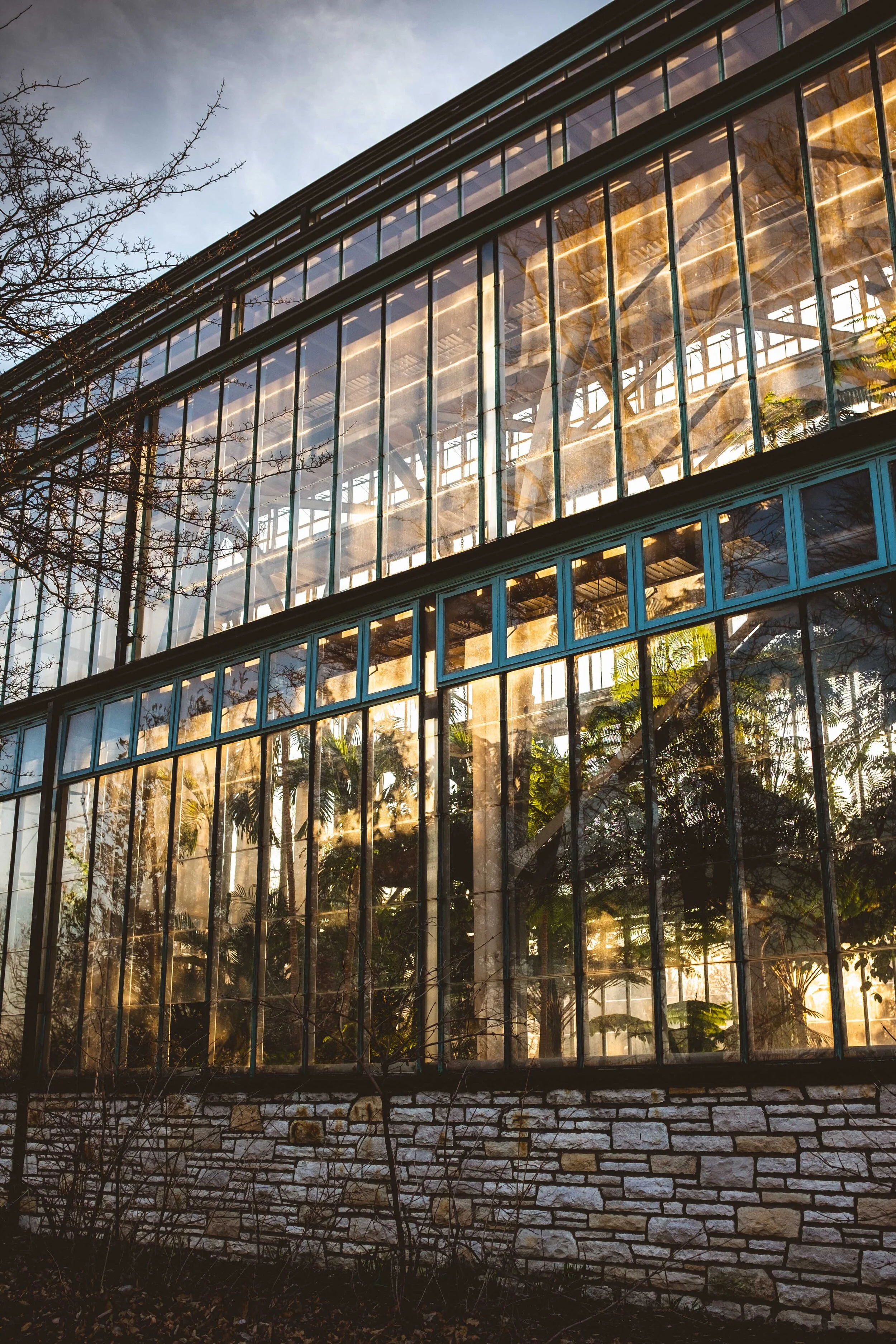
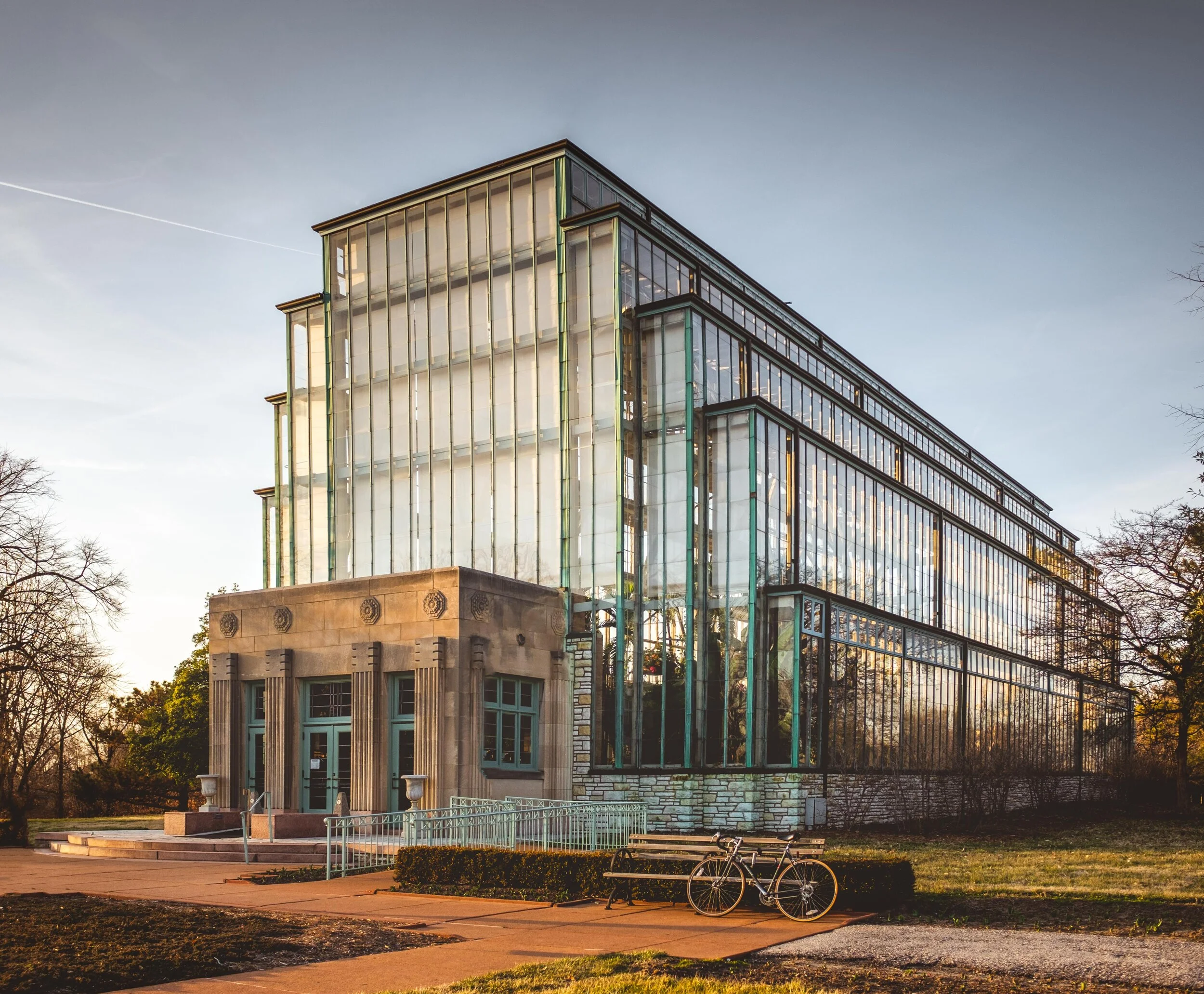
It’s spring break and I finally had time to get out for a bike ride around forest park. This art deco green house was a spot that I wanted to see for a really long time. It was a sunday so it wasn’t open to go inside but I definitely waited around for the light to get good. What I love about this structure is the tall windows gilded in turquoise copper siding, it’s really a sight to behold. At some point a reflection pond is filled and water lilies and tulips line the path up to the greenhouse. My hope is to come back later this spring and capture the same images but with clouds and a long exposure.

DSCF3234.jpg
In Adventures, Blog, Editing, Lifestyle, Photography Tags jewel box, forest park, stl, st.louis, jewel box st.louis, forest park jewel box, Missouri, art deco, golden hour, lightroom, architectural photogrpahy, architecture
Comment
BO9A3699-2-Edit.jpg

Editing Tips: Architecture in Lightroom CC

July 2, 2019

Good architectural photography is one of the most difficult genres as it requires an impressive eye and an expert knowledge of the photographic process. I’m not going to pretend that I know what I’m doing however, there are some impressive tools in Lightroom that can help set your images apart without any fancy equipment. To better understand why architectural photography is so difficult you need to learn about an inherent flaw in most camera designs. Most people don’t notice because it really does matter until you point your camera at a vertically prominent subject. The issue comes in the fact that DSLRs with a standard, non-tilt-shift, lens has a locked plane of view in relation to the sensor. This means when you point your camera up the image distorts with the lens, the wider the worse this effect is. It make the building appear as if it is falling back because the distortion exaggerates the distance away from the top of the building. To get around this issue there are specialty lenses and cameras which instead of tilting the camera up to get the frame you want the sensor stays parallel to the building and the lense physically shifts, moving the image up. While this is the best option to get rid of this problem, these cameras and lenses are really expensive.

BO9A3699-2-Edit.jpg

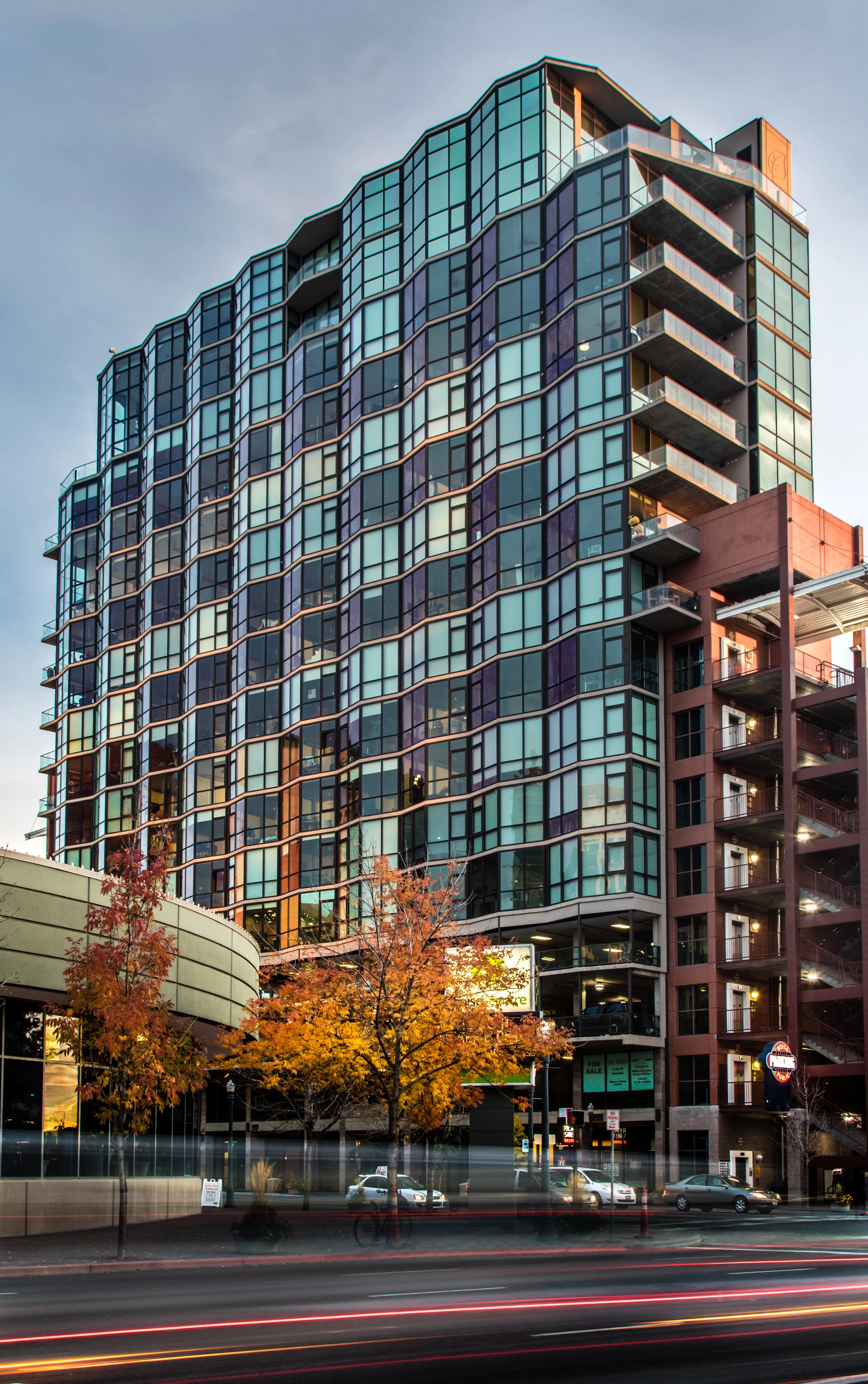
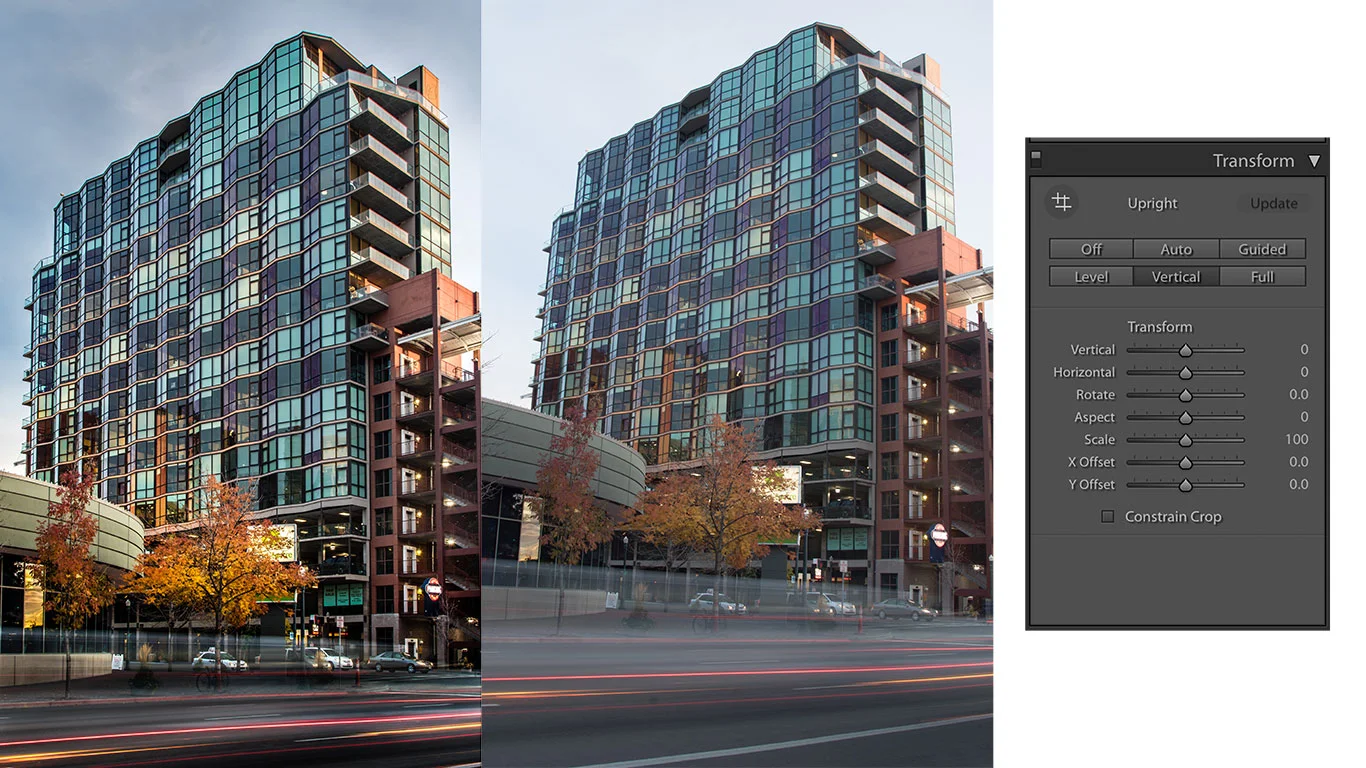
Lucky Lightroom has a good option to make this shift digitally by deleting and adding pixels. The image above is the Aspen Lofts building in downtown Boise wich is really hard to photography as it is leaning against a parking garage and has little prominence. Here even though I was shooting with a wide angle lense I had to tilt my camera up to get the top of the building in frame. As you can see from the middle unedited raw file this pushed the building back making it appear to fall back. To fix this you can take advantage of the transform box in Lightroom. If you are like me then you almost never use this tool as it never really does anything, however here it will save your image. For this picture I used the automatic vertical option which make sure the vertical lines are straight and level. This mimics using the technical movements that a normal lense prevents and solves the building from falling over in your image. While the automatic option worked well here it doesn’t always and most of the time you need to do it manually, if you need to this I would suggest to do a preliminary movement and then a day later fine tune it. I say this because it is really easy to over do it or make it look unnatural or just bad.

Hopefully this short post will help you make your architectural images look better. Even though this is a problem most easily noticed with building be aware that it also creeps into other things like landscapes and sometimes even portraiture.

In Blog, Editing, Photography Tags architectural photogrpahy, lightroom, editing tips, lightroom tips, buildings, tilt-shift, Boise, Aspen Lofts, Image transform, transform tool, Adobe lightroom help, editing help
Comment

Shoot Landscapes in Wildfire Smoke

September 10, 2018

While I was up in Stanley Idaho there was lots of smoke coming from two local fires and some from California. Needless to say, shooting beautiful landscapes in these conditions can be really hard. So here's a couple tips on how to get an image without any smoke. As an ethical disclaimer I always believe it is better to show the scene as it was but this can be an important skill if you are on the job or just simple dislike it.

The two biggest tools you have if you are using Lightroom is the dehaze and clarity sliders. Yes it may seem obvious to use these sliders but the trick is making the result look realistic, these tools over saturate, over contrast, and create color shifts which can ruin your image. 

  1. Dehaze - I start with this slider so I can get rid of most of the smoke haze before I flatten my image with the highlights and shadow sliders. I adjust this as much as I can before I see the smoke either go away or till the color shift seems like too much.
  2. Flatten - Flatten the image with the highlights and shadows. Simply make sure that you aren't introducing more grain or making your highlights go gray.
  3. Contrast - Add whites and black using the alt or option key to fine tune the contrast you are adding. Make sure you aren't blowing you information.
  4. Color Temperature/Saturation - This is the most important part. Make the image the temperature you want and then use this simple trick to get your colors back. Decrease the saturation to an unrealistic amount and then use the vibrance slider to bring it back to something better. By decreasing the global color and then increase the less saturated colors you even out the overall look of the image.
  5. HSL Sliders - I use the hue slider to get the colors back to where they should be. Also, if you are still having saturation problems this is where you can do even more to get it back.
  6. Local Adjustments - This final step will bring your image to life, draw the eye where it needs to go and open up the shadow areas locally to create a more dramatic dynamic of light. Also add more clarity and contrast in the areas that are still effected by smoke, this should make these parts blend in with the rest of the image better.

Finally, if you think this is a really sharp image that's really editable then I'd agree. This is one of the first portfolio shots from my Fuji x100s and it's honestly blowing me away. Having shot through my Canon battery from a timelapse I was initially bummed I had to shoot these images on the Fuji as it's not quite as good as the 7D MK II. However after seeing the sharpness of this RAW file I couldn't be happier. I ended up using this camera from a least half the images I published on here and am super pleases with how it pairs with my main camera.

In Photography, Blog, Editing Tags Photography, editing, Fuji x100s, Fijifilm, Camera, Lake, Reflection, Stanley Idaho, Idaho, Stanley Lake, Sunrise, Sunrise Idaho, x100s
Comment

Editing Tips: My Lightroom Workflow

September 3, 2018

For this blog I'm going to step you through the way I edit all of my images. Just because you follow these directions doesn't mean you will get images like mine but it will get you on the way to creating your own style. I'd like to claim the most important thing to do in photography after learning to shoot in manual is learning how to edit to your own style.

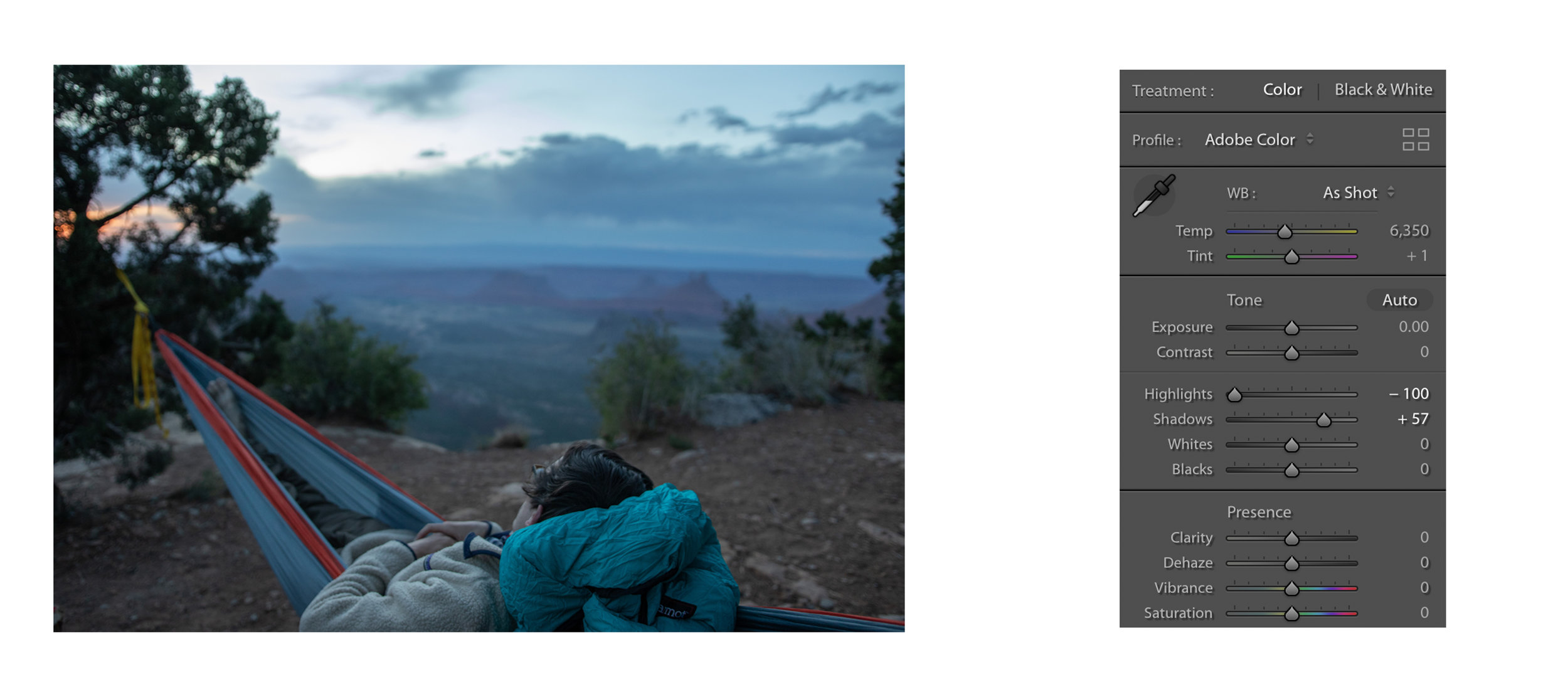
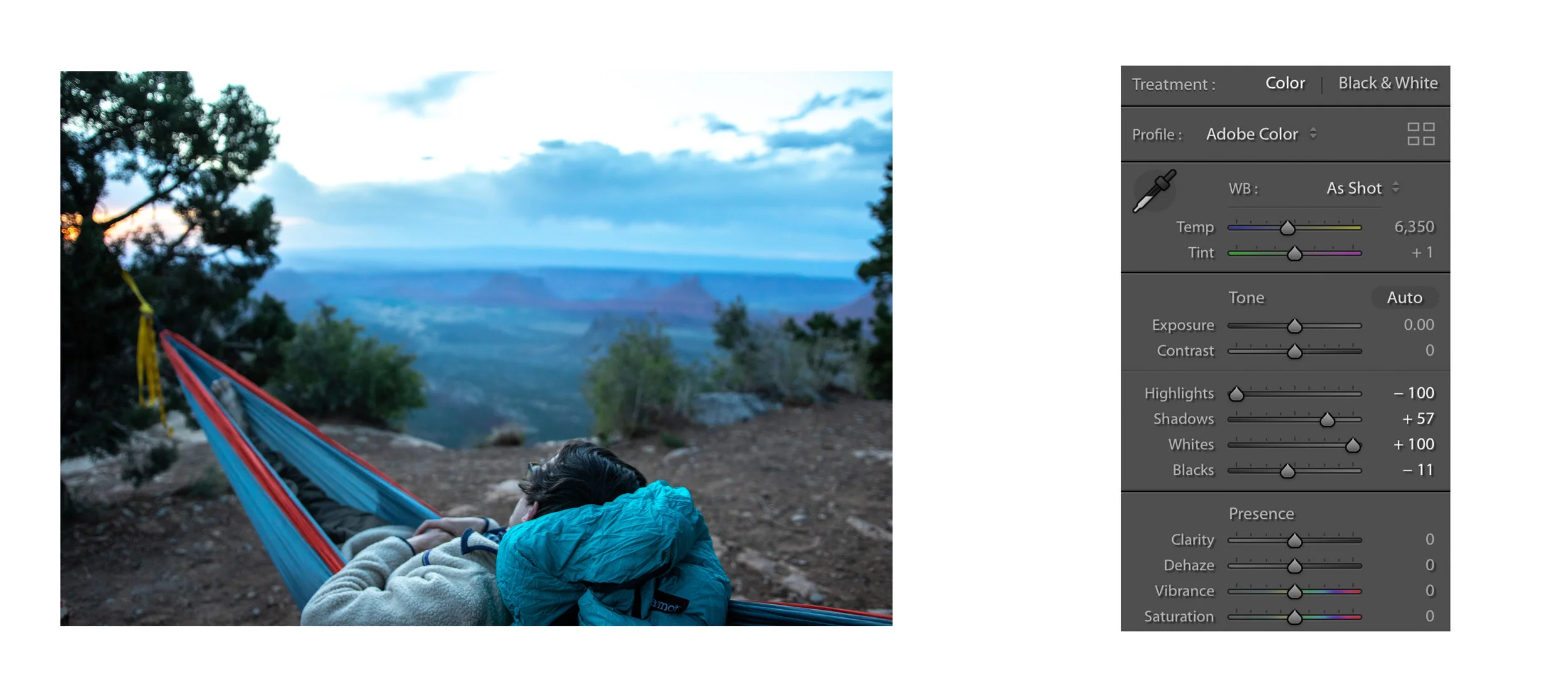
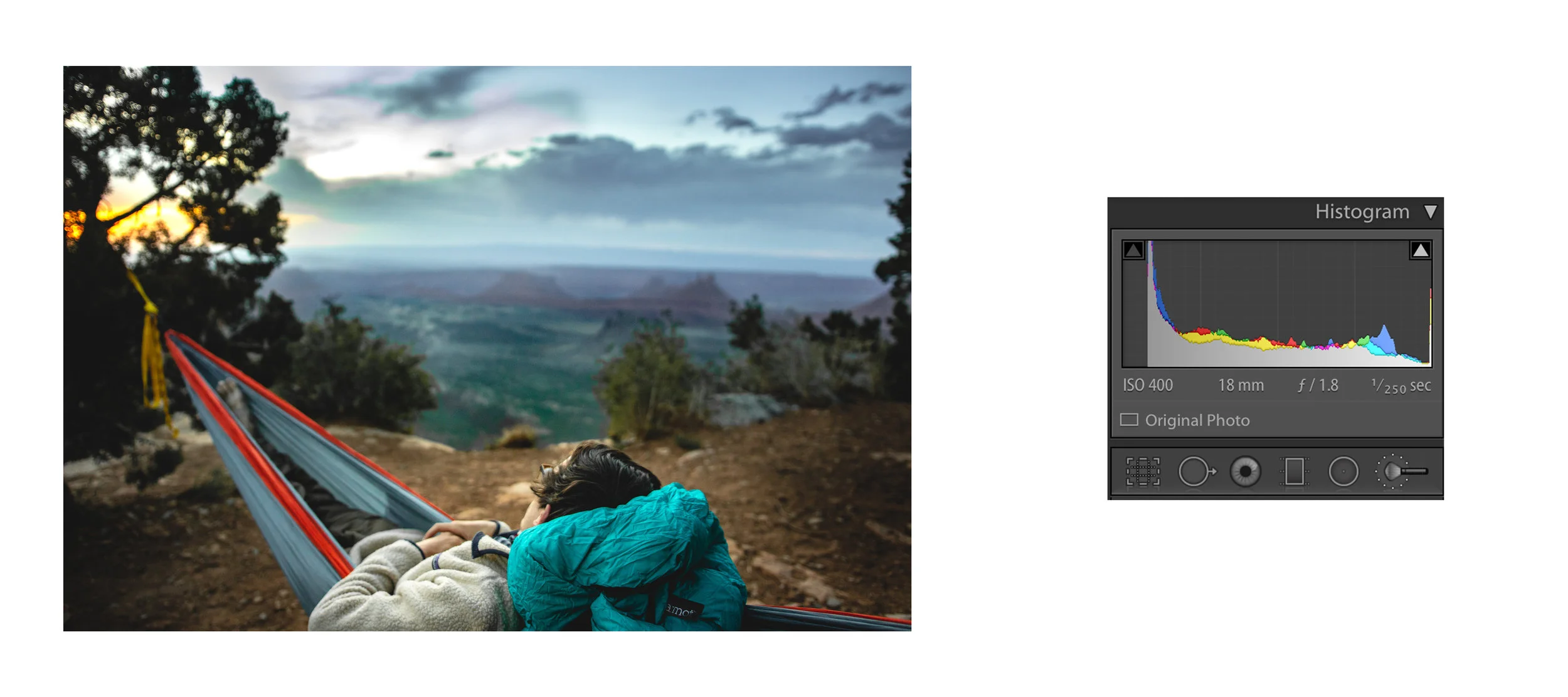
1. Check your histogram: The first thing that I do is check my histogram to see if I need to change the exposure. At this point I also flatten the image by lowering the highlights and bring the shadows up, this gives you the most flexibility when editing but don't over do it.

Untitled-1.jpg

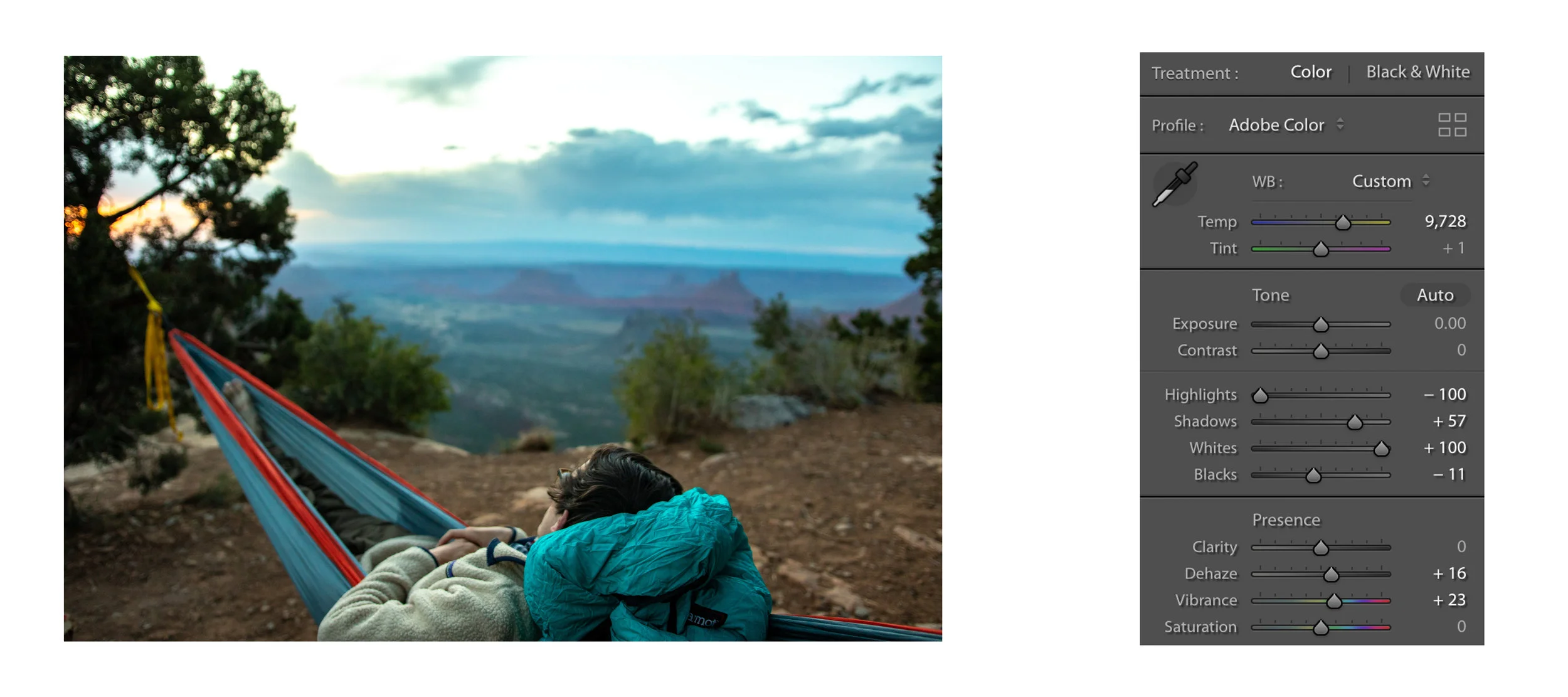
2. Get your true whites and blacks: While holding command or control and moving the white slider your screen will turn white and as you increase the whites black spots will start to appear. These spots tell you where you are clipping the highlights (true white) so I bring the whites up until I just start to see the dots appear. The same thing can be done when lowering the black. I find this is the best way to get natural contrast. This is also the time to add clarity or dehaze if needed, both will slightly alter saturation which is the next step.

Untitled-2.jpg

3. Change color saturation  and temperature: After the whites and blacks are adjusted you usually get a boost in saturation making color shift more evident. There's no prescription for this I simply just change the color temperature till I like it. If there still isn't enough color you have the choice between saturation (increases all color channels) or vibrance (increases subtle colors, leaving already saturated colors alone), I nearly always use just a little vibrance with my 7D MK II.

Untitled-22.jpg

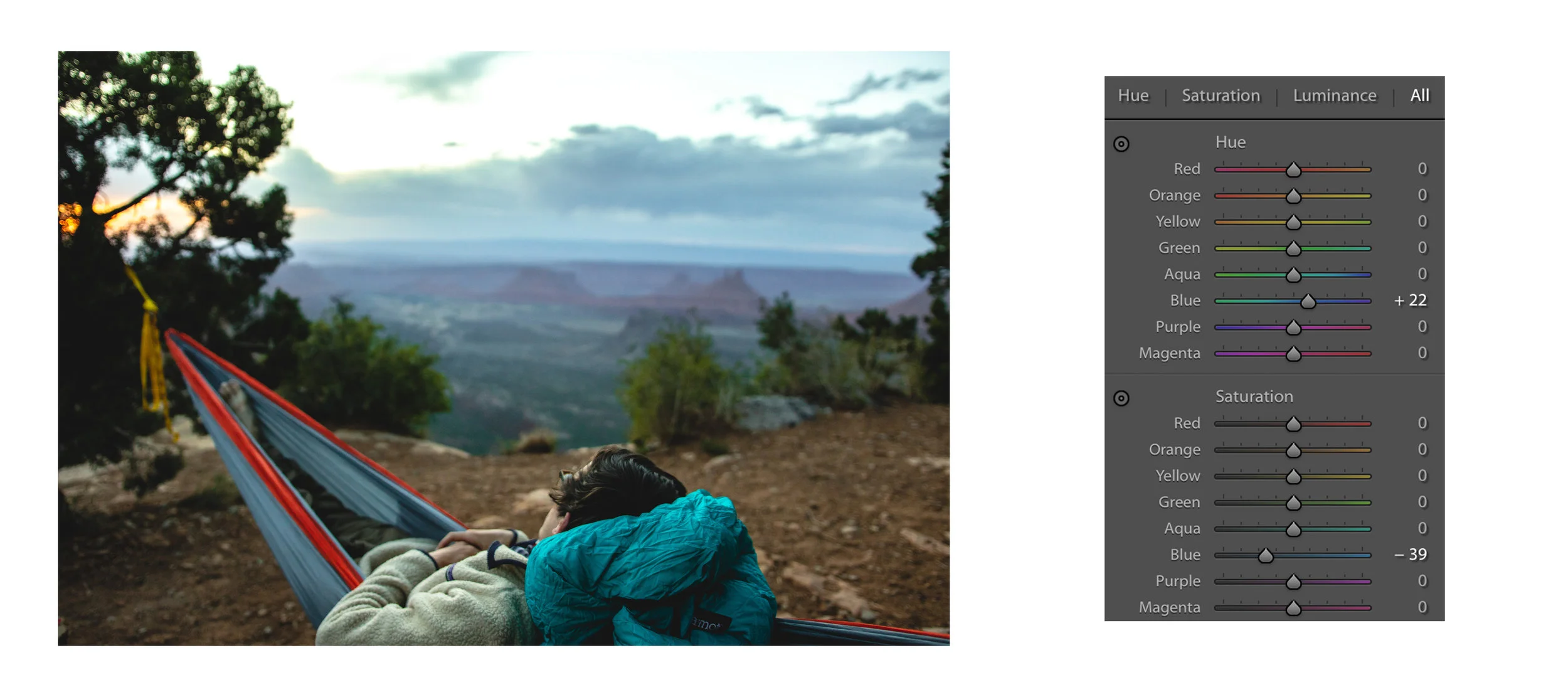
4. Use HSL to correct colors: One of the most important things you can do is use the these sliders to ensure your colors are true to the scene. For me I change the hue of blues and decrease its saturation to achieve the look I like. It can also be helpful for increase the saturation of the oranges in a sunset but leave everything else the same. It is really important that you don't over do this as your photo will start to look fake.

Untitled-3.jpg

5. Cropping, lens corrections, transformations: At this point I focus on making sure the cropping is what I envisioned as well as the horizon is level. There is nothing worse then a crooked horizon! It is also important to make sure that everything that should be straight and/or vertical appears that way. This is where you need to play with lens corrections and transformations. That's actaully one reason why I hat this photo becasue it looks like the horizin isn't straight. Finally, use the dropper to get rid of any chromatic aberration in the high contrast area. 

Untitled-33.jpg

6. Local corrections: This is where you need to take a brake and move on for a short time. It can help to take a step back before doing local adjustments ensure you don't over do it. With the help of the gradient too and brush tool, emphasize the focus of the composition and minimize the distractions. I like a subtle vignette around the corners and adding light to dense shadow areas. If I'm going to print the image I soften the bokeh with a blur tool and then add sharpening in photoshop.

Untitled-4.jpg

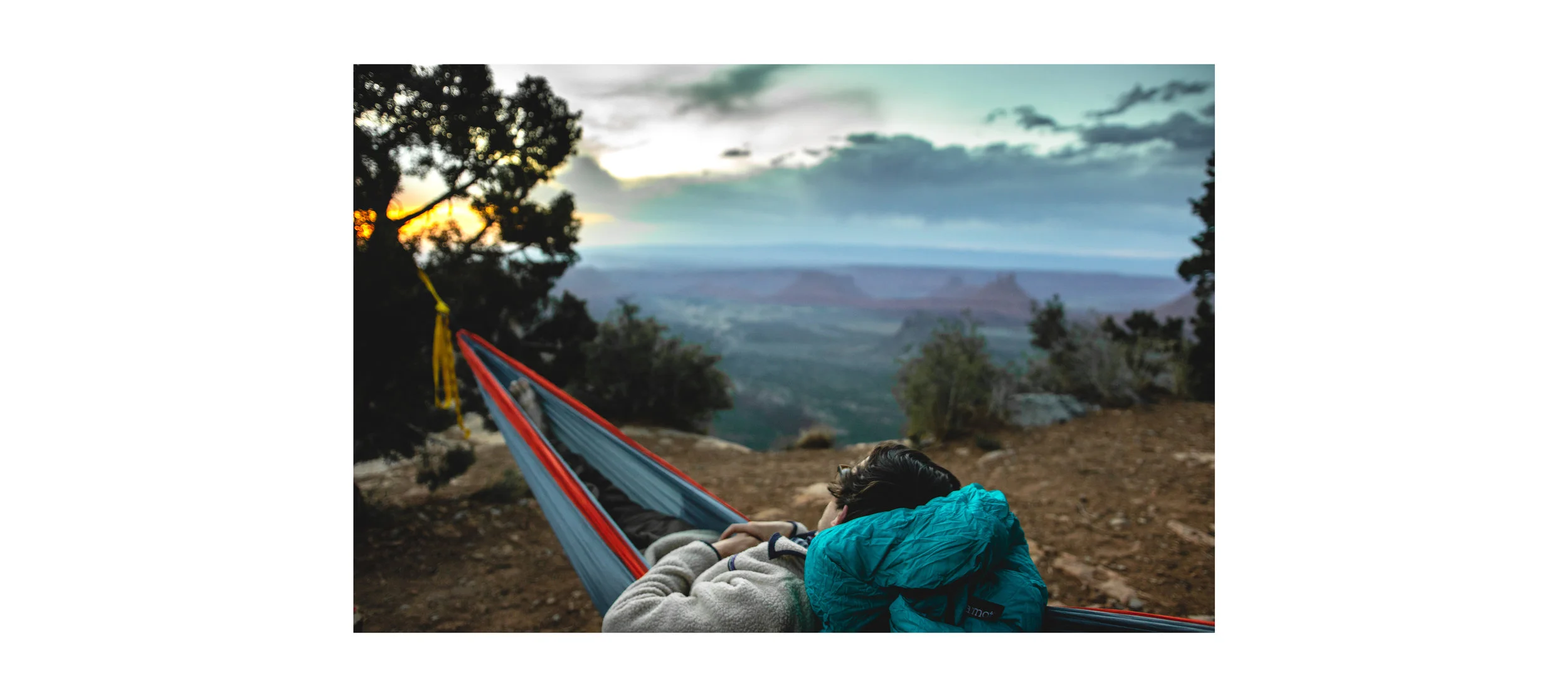
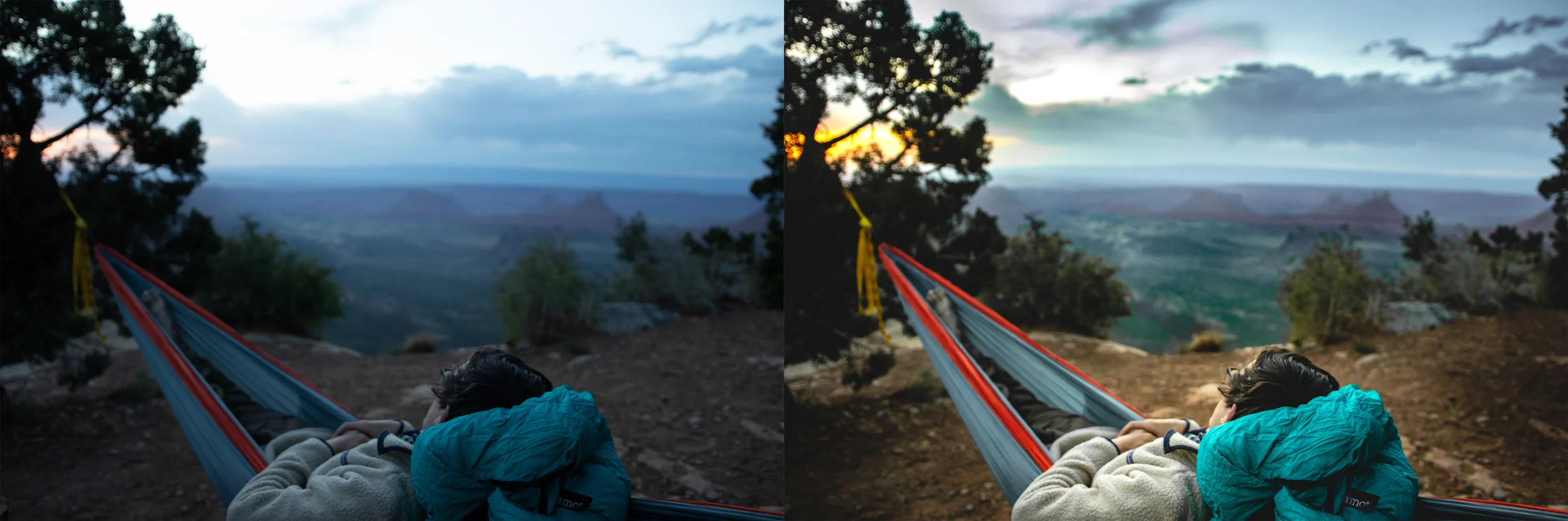
Here is the final before and after of the image. It is definitely a big difference but it is a repeatable look that reflects the image I saw in my head when I took it. (It is what the scene actually looked like) I used more tools and tricks then I wrote here in order to get the look I like. So lookout for more editing tips in Lightroom and before and after of my images. Finally, non of this is possible if you don't shoot in RAW format so shoot in RAW or get images that lack quality and interest. 

Untitled-44.jpg
In Lifestyle, Photography, Editing, Blog Tags Moab, Moab Utah, Utah, hammok, camping, cliff camping, sunset, patagonia, marmot, adventure, adventure lifestyle, canon, canon 7d markii, sigma 18-35mm F1.8, nature
Comment

Latest Posts

Featured
Feb 6, 2026
Hot Take: My 2015 Ricoh GR II is Better Than My 2024 Fujifilm X100VI
Feb 6, 2026
Feb 6, 2026
Jan 31, 2026
Paris in B&W - Spring 2025
Jan 31, 2026
Jan 31, 2026
Dec 13, 2025
Some Crunchy B&W
Dec 13, 2025
Dec 13, 2025
Nov 27, 2025
Back in the Red
Nov 27, 2025
Nov 27, 2025
Aug 24, 2025
The Brother Proposed
Aug 24, 2025
Aug 24, 2025
Dec 14, 2024
My Amazing Travel Camera - Graflex 4x5 Camera (Ok Maybe Not)
Dec 14, 2024
Dec 14, 2024
Nov 3, 2024
Back in Telluride
Nov 3, 2024
Nov 3, 2024
Aug 10, 2024
Quebec City - Canada with Catherine
Aug 10, 2024
Aug 10, 2024
Apr 16, 2024
Hiking the Peak - Telluride
Apr 16, 2024
Apr 16, 2024
Nov 26, 2022
My "New" Yeti Cycles SB-150 (A Post on Buying Bike Used)
Nov 26, 2022
Nov 26, 2022
Nov 4, 2022
Fall in Telluride
Nov 4, 2022
Nov 4, 2022
Sep 27, 2022
First Via Ferrata (Telluride, CO)
Sep 27, 2022
Sep 27, 2022
Aug 31, 2022
Summer Trip With Catherine
Aug 31, 2022
Aug 31, 2022
Aug 17, 2022
Taking Pictures of Lightning
Aug 17, 2022
Aug 17, 2022
Jul 13, 2022
Wet Bowser and a Roll of Kodak Tri-X 120 Souped in Rodinal
Jul 13, 2022
Jul 13, 2022
May 17, 2022
Beer Brewing and Water Quality in St. Louis
May 17, 2022
May 17, 2022
May 15, 2022
Our Time in the Smoky Mountains
May 15, 2022
May 15, 2022
Apr 28, 2022
Leadville Colorado
Apr 28, 2022
Apr 28, 2022
Apr 17, 2022
Winter in Colorado
Apr 17, 2022
Apr 17, 2022
Mar 20, 2022
Red River Gorge on Film (Fall 2021)
Mar 20, 2022
Mar 20, 2022
Jan 27, 2022
Let's Talk Slide Film and Scanning (Epson v550 v.s Flextight X1)
Jan 27, 2022
Jan 27, 2022
Dec 3, 2021
Chicago on Film (Yashica Mat 124G)
Dec 3, 2021
Dec 3, 2021
Nov 30, 2021
The Chicago Trip
Nov 30, 2021
Nov 30, 2021
Nov 15, 2021
Pigeons Playing Ping Pong at the Pageant STL (Shoot on my 8 year old Fuji x100s)
Nov 15, 2021
Nov 15, 2021
Nov 10, 2021
Film or Digital
Nov 10, 2021
Nov 10, 2021
Oct 28, 2021
Climbing the Red River Gorge
Oct 28, 2021
Oct 28, 2021
Oct 22, 2021
The St. Louis Cardinals
Oct 22, 2021
Oct 22, 2021
Oct 13, 2021
Another go at 4x5 Large Format
Oct 13, 2021
Oct 13, 2021
Sep 20, 2021
Smoke in the West
Sep 20, 2021
Sep 20, 2021
Sep 14, 2021
Develop Film in Beer!
Sep 14, 2021
Sep 14, 2021

Powered by Squarespace